



Error: Can’t read file, or Presentation cannot be opened
Lỗi: Không thể đọc tệp hoặc không thể mở Bản trình bày
If you’ve arrived at this article because you got an error message that PowerPoint can’t read a file or that the presentation cannot be opened, it’s likely that Microsoft 365 has blocked the file for security reasons. You can unblock the file so it can be opened:
Nếu bạn đến bài viết này vì nhận được thông báo lỗi rằng PowerPoint không thể đọc tệp hoặc không thể mở bản trình bày thì có thể Microsoft 365 đã chặn tệp vì lý do bảo mật. Bạn có thể bỏ chặn tệp để có thể mở tệp đó:

Open Windows File Explorer (Open Start in Windows and type File Explorer.)
+ Mở File Explorer của Windows (Mở Bắt đầu trong Windows rồi nhập File Explorer.)
Locate the problematic file on your computer.
+ Định vị tệp có vấn đề trên máy tính của bạn.
Right-click the file and select Properties.
+ Bấm chuột phải vào tệp, rồi chọn Thuộc tính.
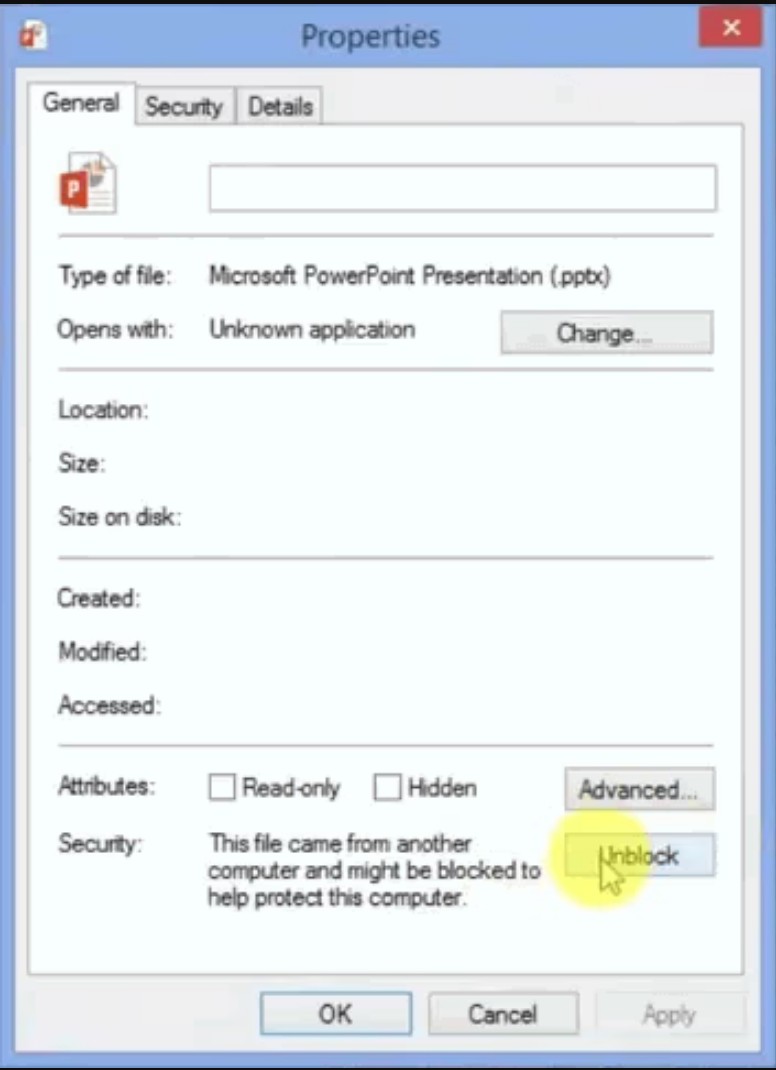
In the Properties dialog box, look for an Unblock button near the bottom right. If it exists, click Unblock, then click Apply, and then click OK to dismiss the dialog box.
+ Trong hộp thoại Thuộc tính, hãy tìm nút Bỏ chặn gần phía cuối bên phải. Nếu nút tồn tại, hãy bấm vào Bỏ chặn, rồi bấm vào Áp dụng, sau đó bấm OK để bỏ hộp thoại này.
Now, attempt to open the presentation again. Right-click the file in File Explorer and select Open.
+ Giờ hãy thử mở lại bản trình bày. Bấm chuột phải vào tệp trong File Explorer và chọn Mở.


